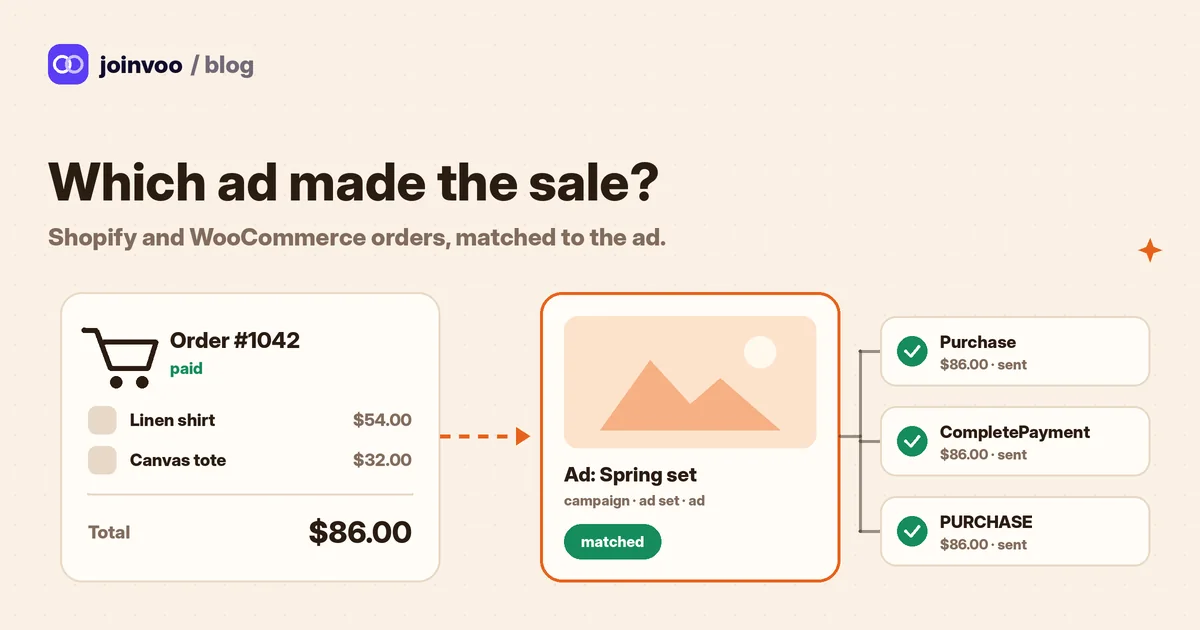
You run an ad. Someone taps it, looks around your store, and buys two days later. Ads Manager may or may not give that sale to your ad. Your store shows the order, but not which ad brought the buyer. So you end up guessing which ads to keep.
This guide shows how to stop guessing. It works for Shopify and WooCommerce, with ads on Meta, TikTok, Snapchat and Google.
How it works
Think of it as a name tag.
- Someone taps your ad. The ad opens your Joinvoo link first. Joinvoo saves the ad click, with the click ID the ad platform added and the pixel cookies.
- Joinvoo opens your store in a blink and gives the visitor a visitor code, like a name tag. Nobody can guess or fake one.
- Your store keeps that code while the person shops.
- When they pay, the order is sent to Joinvoo with the code. Joinvoo reads the tag, finds the click, and knows the exact ad.
- Joinvoo sends the order to your ad platforms as a Purchase, with the value. Now the ad platform learns which people buy, not only which people click.
The same order is only ever counted once. If the buyer refreshes the thank-you page, nothing doubles.
Before you start
- Add your store as a website in Joinvoo: in Channels, tap Add a website and paste your store’s address. Website tracking is on Pro and above.
- Connect the ad platforms you use (your Meta pixel and Conversions API token, TikTok, Snapchat).
- Use the website’s Joinvoo link as the link in your ads. It’s the link Joinvoo gives you for that website.
Then open the website’s settings and find the Track purchases card. Tap Set up in 3 easy steps. The first question is Where do people pay? Pick your store.
Shopify: three steps
Shopify lets stores add their own tracking code under Customer events. That’s where the Joinvoo code goes.
Step 1. Open Customer events. In Shopify, go to Settings → Customer events → Add custom pixel. Name it “Joinvoo”.
If you still see Shopify’s old “Additional scripts” box, ignore it. Customer events replaces it.
Step 2. Paste the code. Joinvoo shows the code for your store. Tap Copy. In Shopify, delete what’s already in the code box, then paste. You don’t change anything. The price and order number fill in by themselves.
Step 3. Save, then Connect. Tap Save at the top, then Connect. That’s it.
A nice detail: if some of your ads point straight at your store instead of the Joinvoo link, the Shopify code saves the ad click itself. The Joinvoo link is still the cleanest option, so use it where you can.
Track this in Joinvoo, free.Every join, start and deposit matched to the ad that drove it. First 500 joins on us.Start freeWooCommerce: two steps
WooCommerce runs on WordPress, so you add the code with a free plugin.
Step 1. Add a free code plugin. In WordPress, go to Plugins → Add New, search “WPCode”, then Install and Activate. Already use a plugin for code snippets? Use that one. You can also paste the code at the end of your child theme’s functions.php.
Step 2. Paste the code as a PHP snippet. In WPCode: Code Snippets → Add Snippet → Add your custom code → PHP snippet. Paste the code Joinvoo shows you, pick Run everywhere, switch it on and Save.
The total, currency and order number fill in by themselves on WooCommerce’s “Order received” page.
Step 4: test it before you spend
The last screen says Let’s test it. You’ll see the Send purchases to switches for Meta, TikTok and Snapchat, and a big Send a test purchase button.
Tap it. If everything works, you see It works! and the card on your website shows ✓ Test purchase received.
- A test is never counted as a sale or in your revenue.
- Ad platforms where you’ve set a test code get a test purchase too. Look for it in their Test Events screen.
- Want to test your real thank-you page? Add
?joinvoo_test=1to the end of its address and open it.
Count each order once: the Meta Pixel question
Many stores already send purchases to Meta. If two tools send the same order, Meta can count it twice. Your numbers then look better than they are.
On Shopify, the Facebook & Instagram app may already send purchases. Meta can’t tell that both are the same order, so pick one:
- Keep Shopify’s app, and switch off Meta under Send purchases to in Joinvoo.
- Or keep Joinvoo, and switch off purchases in Shopify’s app.
On WooCommerce or your own site, give your pixel’s Purchase the same event ID that Joinvoo uses: order_ plus your order number. Then Meta sees one order, not two. Can’t edit your pixel? Switch off Joinvoo → Meta for that site.
Why many owners keep Joinvoo’s side switched on: Joinvoo knows which ad and which funnel brought the buyer, and its events go from server to server, so ad blockers and phone privacy settings don’t stop them.
What gets sent
| Platform | Event | With value |
|---|---|---|
| Meta | Purchase | Yes |
| TikTok | CompletePayment | Yes |
| Snapchat | PURCHASE | Yes |
| Google Ads | the conversion action you picked | Yes |
Each event goes out with the original ad click. Email and phone, when your store has them, are scrambled (hashed) in the buyer’s browser before they leave the page. That helps the ad platform match the sale to the person who saw the ad.
Reading your sales by ad
Once orders come in, open Results → Campaigns. Each campaign, ad set and ad shows its sales and revenue next to clicks and spend. Add your spend and you see ROAS for each ad. The website’s Track purchases card also shows how many sales came in over the last 30 days.
To find your real winners, divide what each ad cost by the sales it made. That’s your cost per sale. A cheap click that never buys is not cheap. We explain how to read these numbers together in Reading your numbers: ROAS, CPL and FTD rate without fooling yourself.
Questions people ask
Do I pay for every order? No. The first purchase from each visitor counts once against your plan, like a join. Later purchases from the same visitor are free.
What about visitors who didn’t come from an ad? They’re ignored, quietly. Only visitors who came from your ads are matched: through your Joinvoo link, or straight from an ad when the Joinvoo code is on your store.
Can I use it without a developer? Yes. Shopify and WooCommerce are copy-paste. If you’d rather hand it over, pick I’ll ask my developer and send the one message Joinvoo writes for you.
Is there a Shopify app? No app to install. It’s a short code you paste once, and the test button tells you when it works.
All the details for websites, online stores and digital products are on the website tracking page. If you also run sign-up or deposit funnels on websites, read Website funnels: track sign-ups and deposits when there's no Telegram.