Most of my “how are the ads doing” moments don’t happen at a desk. They happen in a taxi, between meetings, or at 11 p.m. when I can’t stop thinking about a campaign I scaled that morning. I don’t want to open a laptop and click through four reports. I want one answer: is it working, and what should I do?
That’s why Joe, the assistant inside Joinvoo, now lives on Telegram too. Same Joe, same data, in the app you already have open all day.
What Joe on Telegram is
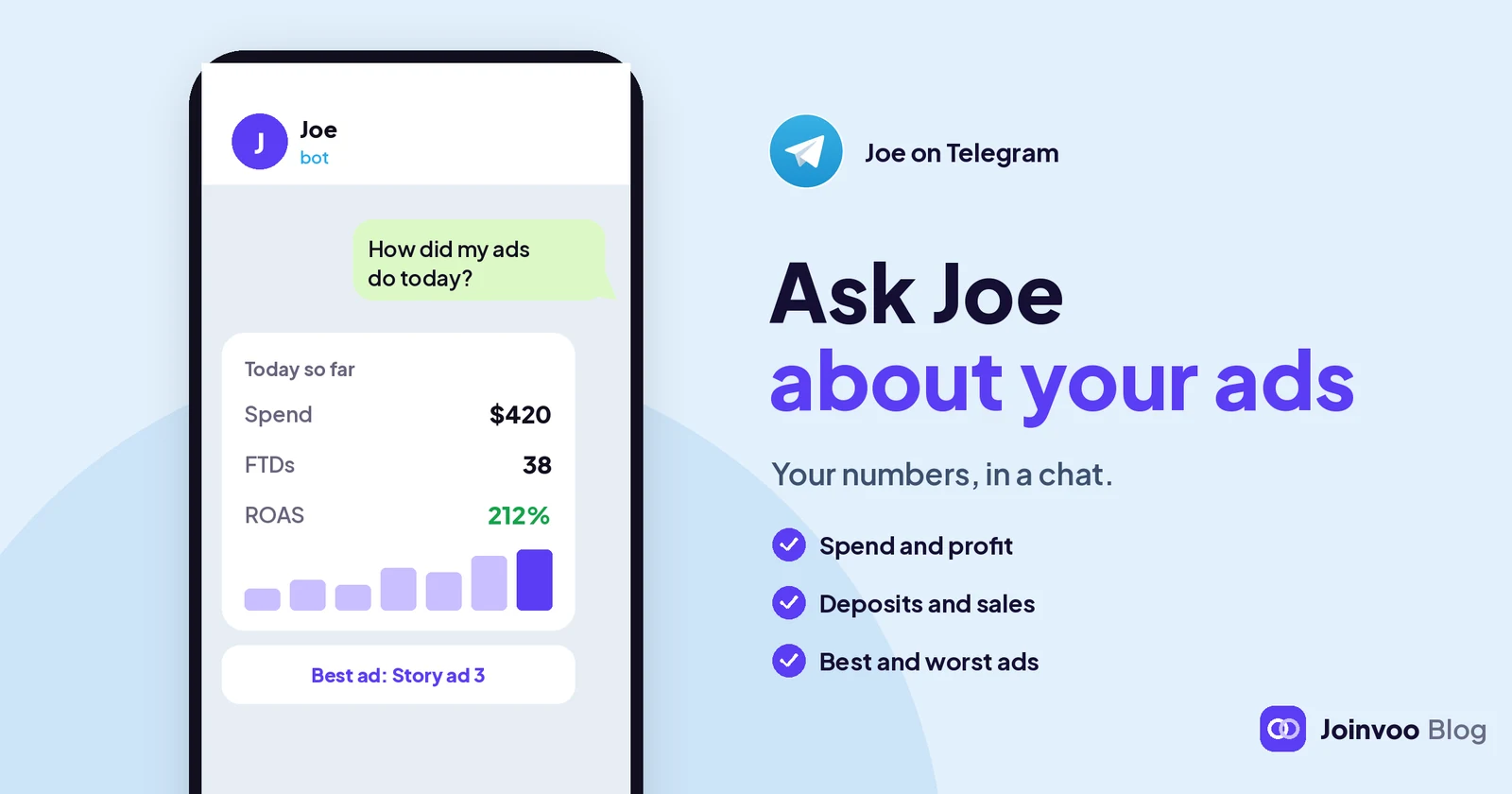
Joe has his own Telegram bot, separate from your alerts bot: @JoinvooJoe_bot, shown as Joe from Joinvoo. Alerts tell you when something happens. Joe answers when you ask.
He answers about the Joinvoo account you linked, from the same live numbers as your dashboard: your ads, campaigns, joins, sign-ups, sales and deposits, depending on what you track. If you sell online, he talks about sales and cost per sale instead of deposits. He answers in the language you write in.
How he talks
Joe on Telegram is built to feel like texting a sharp friend, not reading a report.
- Short. Usually two or three small messages, with “typing…” in between. First the answer, then the reason in numbers, then maybe a question like “Want me to check TikTok too?”
- One recommendation at a time. Not a list of twelve ideas. The one thing worth doing next.
- He remembers. Ask “and yesterday?” and he knows what you mean. Send /new to start fresh.
- He waits for you. If you write again while he’s still answering, he stops and answers your new message.
Some questions to start with:
- “How are my ads doing today?”
- “Why is my cost per FTD up?” (or “cost per sale”, if you sell online)
- “Which campaign should I scale?”
- “What should I fix today?”
Picture cards
Some answers are easier to see than read. Joe can attach one picture card to an answer:
- Last 7 days: your trend day by day.
- Today vs yesterday: a fair comparison, up to the same time of day.
- Top 3 campaigns: your best campaigns side by side, with their platforms.
- Your funnel: where people drop off between click and result.
Under his answer there’s a See it on your dashboard button. It opens your Joinvoo dashboard inside Telegram, on the right page. If Joe talked about one campaign, it opens Campaigns filtered to that campaign. There’s also a Dashboard button next to the message box whenever you want the full picture.
Track this in Joinvoo, free.Every join, start and deposit matched to the ad that drove it. First 500 joins on us.Start freeWhen you’re stuck
This is the part I’d have loved when I started. Tell Joe “I’m stuck”, “my joins aren’t showing” or “how do I connect TikTok?”, and he checks your account first, before saying anything.
He looks at the things that usually go wrong: your email, a billing pause, whether you have a channel or website connected, whether your bot is an admin, your invite links, your ad platform and any errors it sent back, and your postbacks or purchases. Then he names the one problem and the one next step, with a button to the right screen and the matching tutorial video.
Reply “done” and he checks again. If it’s still not fixed after two tries, or if you ask for a person, Joe hands you over: our team gets the conversation, and you get a reply in your dashboard chat. You don’t have to explain everything again.
Setup help is free. It doesn’t use your questions or your credits. Saying “hi”, “thanks” or “ok” doesn’t either.
How the free questions work
Joe on Telegram uses the same daily free questions as Joe in your dashboard, and they’re shared. If your plan gives you 5 a day and you ask 2 on Telegram, you have 3 left in the dashboard. Send /limit any time to see what’s left.
After your free questions, Joe asks before spending anything: Continue with credits, with the price range shown first. It’s the same price per answer and the same monthly budget as the dashboard. If you’d rather wait, your free questions come back at midnight.
Set it up
- In your dashboard, open Joe.
- Under the chat, find Chat with Joe on Telegram and tap Connect in one tap.
- Telegram opens. Tap Start. Joe replies “You’re connected”, and the card in your dashboard shows Connected.
- Ask your first question.
The commands you’ll use: /help (what Joe can do), /limit (free questions left today), /new (start a new conversation), /pause and /resume (switch Joe chats off and on). You can also pause from the card on the Joe page.
What he won’t do
I’d rather you trust Joe than be impressed by him, so here are the limits:
- Joe never invents numbers. If something isn’t tracked or connected, he says so and tells you what to connect. He answers from your data or not at all.
- Private chats only. Add him to a group and he stays quiet there.
- One account per chat. Joe answers about the account that linked him. A teammate working in your account can’t link your Joe to their Telegram.
- Text questions only. For screenshots, use Joe in your dashboard, or type what you see.
- Short on purpose. Telegram answers are capped in length. For a long analysis, open the dashboard.
- Picture cards aren’t drawn in every language. In Arabic, Hindi and Thai, Joe sends text and the dashboard button instead.
- There’s a daily limit on Telegram, free and paid together, so one chat can’t run away with your credits.
The point
Your numbers shouldn’t wait until you’re at a desk. Connect Joe on Telegram, ask one question a day, like “what should I fix today?”, and act on the answer. If your cost per result looks too good to be true, he’ll tell you that too. For why that matters, read Why your cost per subscriber lies to you.