Many people run a Telegram community the same way. A free channel to warm people up. A paid group, a VIP channel or a course group for the people who pay. Ads bring new faces to the free side.
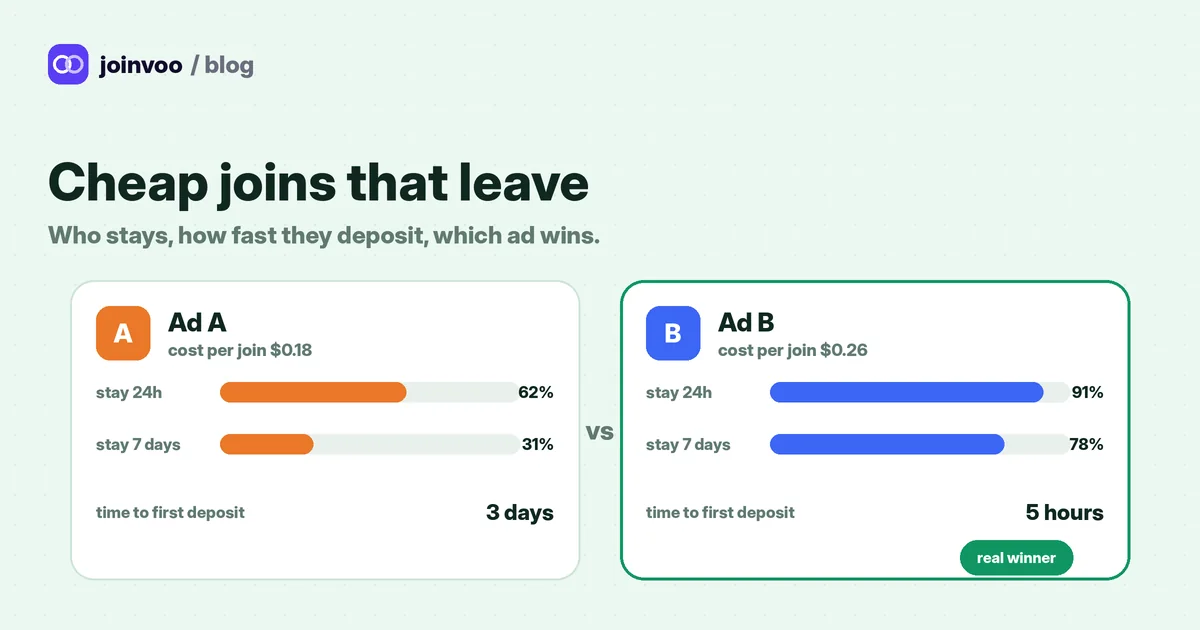
It feels like it’s working when the member count goes up. But the member count hides the real questions. Which ad brought the people who stayed? Which ad brought the people who paid? An ad can fill your channel with people who leave the same day, and still look great in Ads Manager.
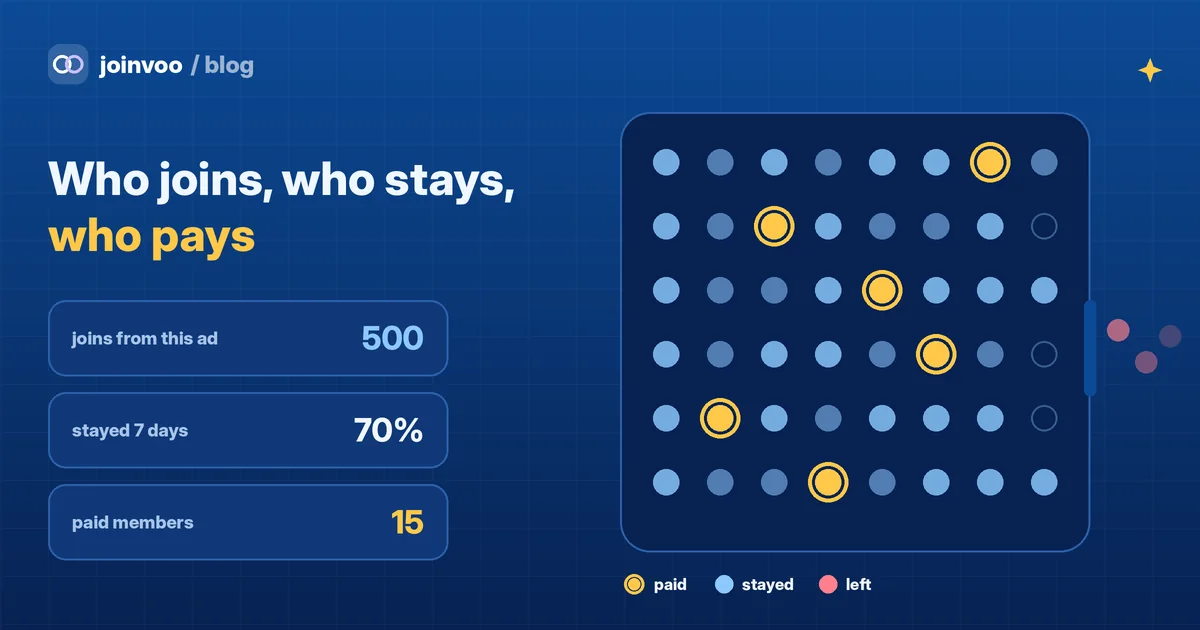
The three counters
Picture three counters at the door.
- Joins. How many people came in from each ad.
- Who stayed. How many of them are still there a day later, and a week later.
- Paid members. How many of them paid, and how much.
A good ad scores well on all three. A cheap ad often scores well only on the first one.
Counter 1: joins, matched to the ad
Joinvoo gives each ad click its own invite link. When someone joins through it, Joinvoo knows which click it was, and so which campaign, ad set and ad.
To set it up:
- Add your channel or group in Joinvoo and make your tracking bot an admin with the Invite users via link permission. It needs that to make invite links. It never posts.
- Connect Meta, TikTok or Snapchat, so each join can be sent back to the ad platform.
- Use your Joinvoo tracking link in the ad, never the channel’s normal invite link.
- Test with a phone and a Telegram account that isn’t in the channel yet.
People who find you without an ad (a search, a friend’s forward) show as organic. That’s normal, and it keeps your ad numbers honest. A private channel keeps most joins coming through your links. The full setup is in How to track Telegram channel joins from Meta ads.
Counter 2: who stays
Joinvoo also sees when someone leaves your channel or group. So every ad, ad set, campaign and country shows two more numbers, in Results → Campaigns → Quality:
- Stayed 24h: of the people this ad brought, how many were still there after a day.
- Stayed 7 days: the same, after a week.
Only joins that are old enough are counted. Someone who joined two hours ago isn’t counted as stayed or left yet. If you add your ad spend, you also see the cost per person who stayed. That ranking is often very different from cost per join.
For a paid community, this counter matters a lot. People who leave in the first day almost never pay. People who stay a week are the ones reading your posts, and the ones your offer reaches.
We go deeper on this in Cheap joins that leave: who stays, how fast they deposit, and which ad really wins.
Track this in Joinvoo, free.Every join, start and deposit matched to the ad that drove it. First 500 joins on us.Start freeCounter 3: paid members
This is the counter most community owners never see by ad. To fill it, Joinvoo needs to hear about each payment, with the payer’s Telegram ID. The Telegram ID is the thread that ties the payment to the join, and the join to the ad.
Step 1: know who is paying
Your payment has to carry the person’s Telegram ID. Two common ways:
- You sell access with a bot. The bot already knows the Telegram ID of the person it’s talking to.
- You send people a payment link. Turn on Request-to-join + welcome message for your channel. People tap Request to join, the bot lets them in at once, and sends your welcome message with your link. Put
{tg_id}in that link, and Joinvoo swaps it for each person’s Telegram ID. Your payment tool then receives the ID with the payment.
Step 2: send Joinvoo a sale
Pick whichever fits the tools you already use:
- A postback. In Conversions → Integrations, pick Custom postback and copy your postback address. If the tool that takes your payments can call a web address when someone pays (look for “webhook” or “postback” in its settings), paste it there with the event set to
sale:
https://joinvoo.com/pb/YOUR-KEY?tg_id=7012345678&status=sale&payout=29¤cy=USD&txid=pay-1001- Zapier. Use Joinvoo’s Record a Deposit or Sign-up action, with Event set to Sale, the Telegram user ID, the amount and a payment ID.
- The API.
POST /conversionswith"event": "sale". Our The Joinvoo API, start to finish: keys, endpoints, webhooks and 5 things to build this week shows the call.
Always send a payment ID (txid). The same ID twice is recorded once, so retries never double count.
What happens next
- Joinvoo finds the person by their Telegram ID and puts the sale on the ad that brought them.
- The sale goes to Meta as Purchase, TikTok as CompletePayment and Snapchat as PURCHASE, with the amount. Your ads start to learn what a paying member looks like, not only what a joiner looks like.
- The sale shows in your revenue and ROAS for that ad.
Putting the three counters together
Here is how the numbers can look side by side.
A simple weekly routine:
- Check who stayed first. An ad with a low 7-day number is buying people who don’t stick, however cheap the join.
- Then check paid members and revenue per ad. That’s the money.
- Divide spend by paid members to get your cost per paid member. Compare it with what a member pays you.
- Move budget to the ads where that number works. Give new ads a fair chance before you judge them.
Questions people ask
Does this work for groups, not only channels? Yes. Joins and leaves are tracked for channels and groups.
What if a person joins from two different ads? The sale goes to the ad they joined from most recently.
Do I need a developer? Not for joins and who stayed. For paid members, you need your payment tool to send the sale. A postback or Zapier usually does it without code.
Can I see each person? Yes. Each join shows the ad it came from, and later the sales from that person.
Running a website or a payment page too? See the website tracking page and Selling an eBook or course on Selar, Gumroad or Payhip: which ad really sold it?. For how long it takes ads to earn back their cost, read When do your Telegram ads pay back? Payback and LTV explained.