Most media buyers end up with the same problem once they grow: numbers live in too many places. Ads Manager has spend. The affiliate program has deposits. Joinvoo ties them together. But your own sheet, your client report, your CRM and your team’s bot each need a copy, and copying CSVs every morning doesn’t scale.
The Joinvoo API fixes that. This guide covers all of it in one place. It’s written so a media buyer can follow it, and a developer can build from it.
What the API is (and isn’t)
Think of the API as a window into your Joinvoo account that a program can look through. Anything you can read in Results, a program can read too: totals for a date range, each day, each channel, and the same numbers split by campaign, ad set, ad, country, platform, language or placement.
It can also do one thing that changes data: record a sign-up or deposit for a Telegram user. That’s for programs that can’t send a postback, or for your own payment system. Joinvoo treats it exactly like a postback. It matches the deposit to the person and their ad, and sends it to Meta, TikTok, Snapchat and Google.
What it doesn’t do: change your channels, offers, settings or team. Those stay in the dashboard, so a leaked key can never rewrite your setup.
Step 1: make a key
- Open Conversions → Integrations → Developer API and tap Make a key.
- Give it a name you’ll recognise later (“Client report – Aria Media”, “My CRM sync”).
- Pick what it can do. Leave it on Stats unless the tool needs more.
- Optional, and worth it: pick the channels it can see, the IP address of the server that will use it, and an expiry date.
- Copy the key now. It looks like
jv_live_…and is shown once. Joinvoo only keeps a scrambled fingerprint of it, so nobody, including our team, can show it to you again.
Only the account owner can make keys (team members can’t), and only on Pro or the free trial. Making a key asks for your password again if you haven’t logged in in the last 15 minutes, because a key lives longer than a login.
The four permissions
| Permission | What it opens |
|---|---|
| Stats, campaigns and channels | /me, /channels, /stats, /breakdown, /profit |
| People who joined | /joins (includes Telegram names and usernames) |
| Sign-ups and deposits | GET /conversions |
| Record sign-ups and deposits | POST /conversions |
You can take a permission away from a key later, but never add one. Want more power? Make a new key. That way a key can never quietly gain access it didn’t have on day one.
Step 2: call it
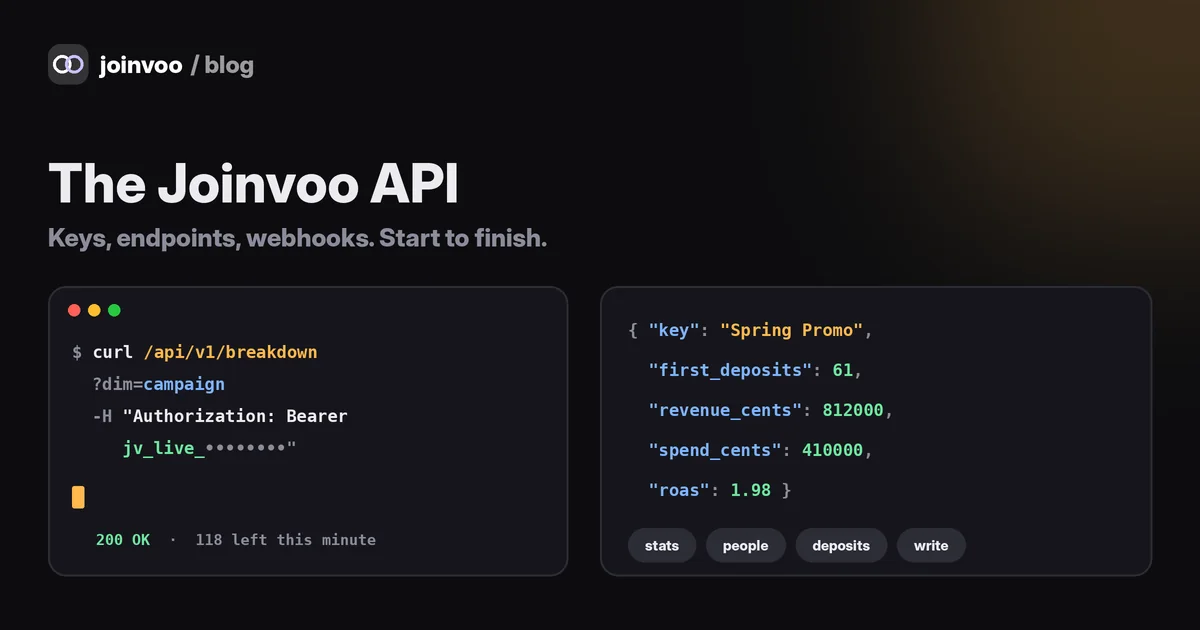
Every address starts with https://joinvoo.com/api/v1. Send your key in the Authorization header:
curl "https://joinvoo.com/api/v1/stats?from=2026-11-01&to=2026-11-05" \
  -H "Authorization: Bearer jv_live_YOUR_KEY"
Three rules that save headaches:
- Never put the key in the address (
?api_key=…). Joinvoo refuses it, because addresses end up in logs and browser history. - Call from a server, not a web page. Browsers on other websites aren’t allowed to call the API, so your key never sits in someone’s browser.
- Dates are days like
2026-11-01, both ends included.tzis your time zone as minutes behind UTC (the same as JavaScript’sgetTimezoneOffset()): West Africa and Central Europe in winter are-60, London0, New York300. Money is always in cents (4999= 49.99).
Every endpoint, explained
GET /me: “does my key work?”
Your account, this key’s permissions and its limits. Call it once when you set something up.
GET /channels: your tracking links
Every channel, group, bot and DM link, with its tracking link and which ad platforms are connected. Use the id to ask for one channel elsewhere (channel=12).
GET /stats: the totals
Clicks, joins, organic joins, leaves, filtered (fake) joins, sign-ups, first deposits, repeat deposits, sales, revenue and spend, plus each day and each channel.
One field deserves attention: not_tracked. These are sign-ups and deposits your program sent that Joinvoo couldn’t tie to anyone who joined from your links, usually because the postback had no Telegram ID or click ID. They’re kept out of your ad numbers (so your ROAS isn’t inflated), but they’re counted here so nothing goes missing. If this number is big, fix the postback.
GET /breakdown: the same numbers, split
Add dim= to split by campaign (default), adset, ad, source, platform, country, lang, channel, app (Facebook, Instagram, Messenger…) or placement (like Instagram Reels or Facebook Stories). Each row has clicks, joins, join rate, sign-ups, first deposits, revenue, spend, cost per join, cost per first deposit and ROAS.
This is the endpoint most reports are built on.
GET /profit: what you actually made
The Profit page as data: spend, what you earned (your payouts or real commission), profit, ROI and cost per first deposit, per campaign, ad set or ad, with each day and the previous period of the same length for comparison.
GET /joins: the people
Who joined, newest first: Telegram ID, name, username, language, country, when they joined or left, the ad they came from, and their sign-ups and deposits. Filter with type=tracked|organic|left|ftd|filtered and search with q=. Visitors’ IP addresses, devices and ad cookies are never included.
GET /conversions: sign-ups and deposits
Every sign-up, first deposit, repeat deposit, sale, reversal and payout, with the ad it came from, whether it was sent to Meta, TikTok and Snapchat, and the program it came from. No names here, on purpose.
To follow new ones, use since_id: start with since_id=0, save the last_id you get back, and send it next time. You get everything newer, oldest first. Nothing is missed or counted twice.
POST /conversions: record a deposit yourself
curl -X POST https://joinvoo.com/api/v1/conversions \
  -H "Authorization: Bearer jv_live_YOUR_KEY" -H "Content-Type: application/json" \
-d '{"tg_user_id": 6510981724, "event": "ftd", "amount": 49.99, "currency": "USD", "txid": "pay-1001"}'event:reg(sign-up),ftd(first deposit),dep(repeat deposit),sale,qualified,rejected(reverses a deposit) orpayout(your commission).- Always send
txid(your payment ID). The sametxidtwice is recorded once, so your retries are safe. 201means new,200with"duplicate": truemeans already recorded, and"tracked": falsemeans nobody with that Telegram ID joined through your links. It’s saved, but kept out of your ad numbers.
GET /offer: for your own bot
If you run offer rotation and your own bot, this tells the bot which offer, minimum deposit and message to give one person, based on your rules (their country, phone, the split, the current winner). The person keeps that offer, so their deposit comes back matched.
Limits, and how to stay under them
- 120 requests a minute and 20,000 a day per key. Recording conversions: 60 a minute per key.
- Every answer tells you where you stand:
X-RateLimit-Limit,X-RateLimit-Remaining,X-RateLimit-Reset. - Over the limit you get
429withRetry-Afterin seconds. Wait that long, then continue. - Lists return up to 200 rows; use
offset(orsince_idfor conversions) for the next page.
In practice: a report that refreshes every 5 minutes uses about 300 requests a day. You’d need to try hard to hit the limit.
Errors you can actually read
Every error is JSON with a sentence a person understands and a code a program can check:
{ "error": "This key can't do that. It needs the "People who joined" permission.", "code": "missing_scope" }| Status | What happened |
|---|---|
| 400 | Something in the request is wrong (bad_date, bad_event, key_in_url…). The message says what to fix. |
| 401 | No key, a wrong key, a revoked or expired key. |
| 402 | The account is no longer on Pro. Keys work again when it is. |
| 403 | The key lacks that permission, or the request came from an IP the key doesn’t allow. |
| 429 | Too many requests. Wait for Retry-After. |
| 503 | The API is paused for maintenance. Try again shortly. |
How your key stays safe
A key is like a password that never logs out, so Joinvoo treats it that way:
- Never stored. Only a scrambled fingerprint is kept. A copied database or backup can’t be used to call the API.
- Read-only by default, with permissions that can only shrink.
- Locks you choose: channels, IP addresses, expiry date. Revoking is instant.
- Emails you’d want: one when a key is made, and one when a key is used from a country (or network) it was never used from before, with a one-tap way to revoke it. If you moved your tool to a new server, ignore it. If you didn’t, revoke the key.
- Guessing doesn’t work. After 20 wrong keys from one network, that network is blocked for 15 minutes.
- A full log. Your dashboard shows each key’s last use and the last 50 requests.
- Password reset revokes every key, because a key made by someone who had your login shouldn’t outlive the fix.
Good habits on your side: one key per tool, only the permissions it needs, keep it in an environment variable on your server (never in a web page, an app you hand out, or a public code repository), and lock it to your server’s IP if it has a fixed one.
Webhooks: when you want events the moment they happen
The API is for asking (“what happened since this morning?”). Webhooks are for being told: Joinvoo sends each join, sign-up and deposit to your server as it happens. Set one up in Conversions → Integrations → Send events to your own server.
Because anyone could send a fake event to your server address, every webhook carries a signature:
X-Joinvoo-Timestamp: when it was sent (seconds).X-Joinvoo-Signature:sha256=plus an HMAC-SHA256 of timestamp + “.” + the raw body, made with your webhook’s signing secret.
Your server should check it in three steps: read the raw body, compute the same HMAC and compare it with a constant-time compare, and refuse anything older than 5 minutes. Here it is in Node:
const want = 'sha256=' + crypto.createHmac('sha256', process.env.JOINVOO_WEBHOOK_SECRET)
  .update(ts + '.' + rawBody).digest('hex');
const ok = sig.length === want.length && crypto.timingSafeEqual(Buffer.from(sig), Buffer.from(want))
  && Math.abs(Date.now() / 1000 - Number(ts)) < 300;
The developer docs have the full version for Node, Python and PHP, ready to paste.
Five things to build this week
1. A morning report in your team’s Telegram group
Every day at 9:00, a small script calls /breakdown?dim=campaign for yesterday and posts the top 5 campaigns (joins, first deposits, cost per first deposit, ROAS) into your team group. Ten minutes of code with any language, and nobody has to open a dashboard to know how yesterday went.
2. Every depositor in your CRM
Every 5 minutes, call /conversions?since_id=LAST&event=ftd, and for each new deposit create or update a contact in your CRM with the amount, currency and the campaign it came from. Your retention team now knows which ad brought each customer. No developer? Zapier’s New Deposit or Sign-up trigger does the same.
3. A live client report for an agency
Make a key for that client’s channels only, with the Stats permission. Paste it into the Google Sheets template (Extensions → Apps Script → paste → Joinvoo → Set API key → Refresh every hour). Share the sheet with the client. They see their numbers, updated hourly, and nothing else. The key lives in your Google account’s script settings, never in a cell, so sharing the sheet doesn’t share the key.
4. Deposits from a program that can’t send postbacks
Some programs only offer a daily export or their own API. Run a small job that reads their deposits and sends each one to POST /conversions with the person’s Telegram ID and the program’s transaction ID as txid. Joinvoo matches it to the ad and sends it to Meta, so your campaigns still optimise for real deposits, and retries never double count.
5. Your own bot giving each person the right offer
If you built your own Telegram bot, call /offer?channel=…&tg_id=… when someone taps Start. You get the offer link, the minimum deposit and the message for that person, picked by your rotation rules. They keep the same offer every time, so their deposit comes back matched to the right ad.
For networks and tool makers: the Partner API
If you’re an affiliate network, a program or a tool that many Joinvoo users want to connect, apply in More → Partner program. Approved partners get a code (like JVP-AB12CD) and 5× the normal limits. A user connects you by pasting your code and ticking exactly what you may do, for example read their stats or record their deposits. You then call /partner/accounts to see who connected you, and act only within what each one allowed.
Questions people ask
Do I need to be a developer? No. The Google Sheets template and Zapier cover the most common uses without code. The API is there when you want more.
Will the API numbers match my dashboard? Yes. They come from the same place, with the same rules: fake joins filtered, rejected deposits removed, money converted to dollars at the day’s rate.
Can my media buyer or client make a key? No, only the account owner. Make one for them, limited to their channels.
What if a key leaks? Revoke it in the dashboard and it stops at once. Then make a new one locked to your server’s IP. The new-place email often tells you before you notice anything else.
Is there a cost? The API is part of Pro and the free trial. There’s no extra charge per request.
Ready? Open Conversions → Integrations → Developer API, make a read-only key, and call /me. If you get your account back, you’re connected. The full reference, with every field, lives at joinvoo.com/developers.