Every media buyer has a picture in their head of who their audience is. Most of us never check it. You assume “everyone is on Android” or “my buyers are on iPhone” and build your ads, your landing page and sometimes a whole app around that guess.
Joinvoo already saves which phone or computer each person used when they tapped your tracked ad link. The new Devices page turns that into an answer you can read at a glance: what your audience uses, and whether the same devices are the ones that deposit or buy.
Where to find it
Open Results, tap People, then Devices. It uses the same filters as your other reports:
- the date range at the top (Today, 7 days, 30 days and so on)
- ad platform, campaign and country
- the channel picker, if you only want one channel or website
Nothing to set up. Past dates work too, because the device was saved with every click.
1. What your audience uses
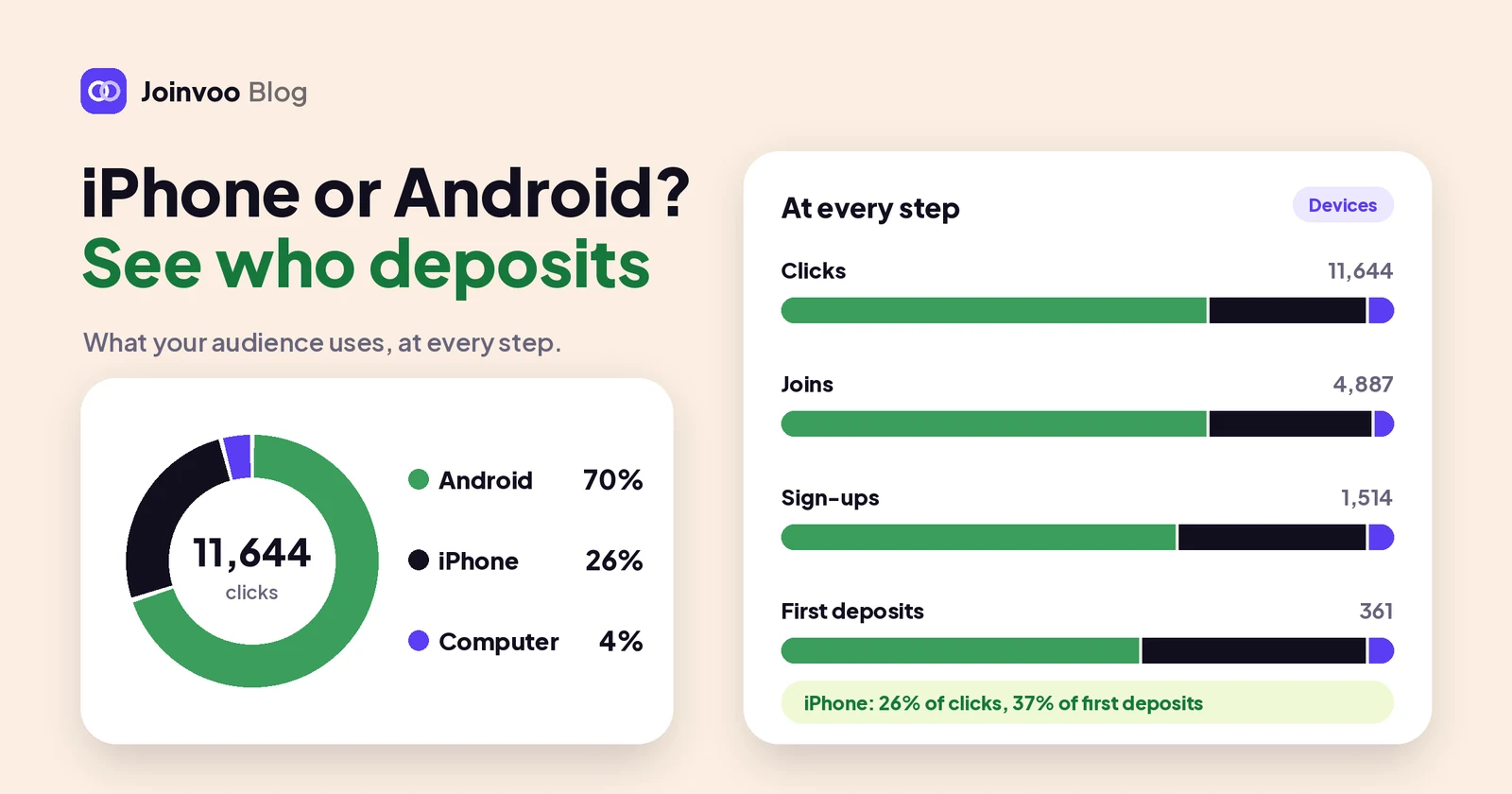
The first card is a donut of your audience with the number in the middle. Under it, each device with its share and count:
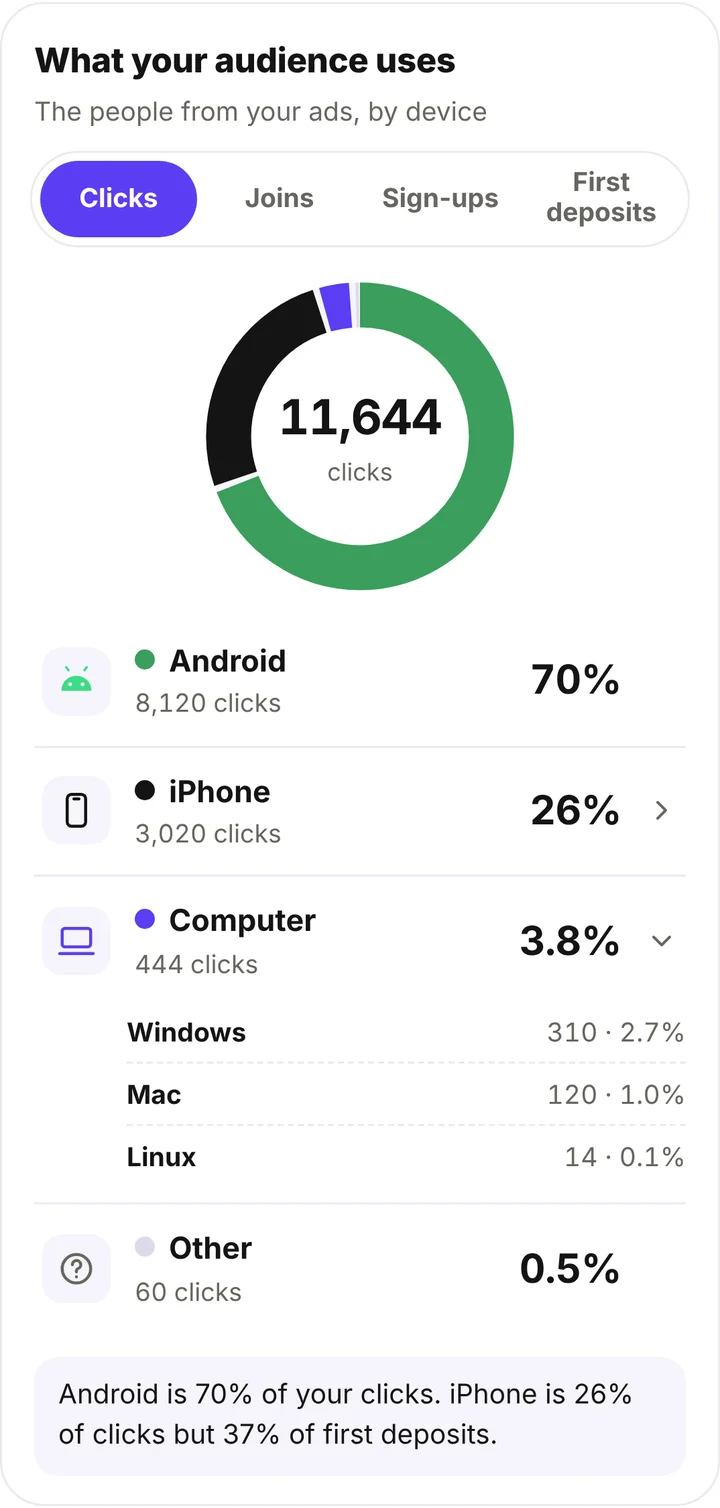
Tap a group to see what’s inside it. iPhone opens to iPhone and iPad. Computer opens to Windows, Mac, Linux and Chromebook. “Other” is anything Joinvoo can’t recognise, usually a bot or an unusual browser.
The line under the card sums it up for you. If the mix changes a lot between clicks and deposits, it says so, for example “iPhone is 26% of clicks but 37% of first deposits.” That second part only shows once you have 20 or more first deposits (or sales), so it isn’t based on two lucky people.
2. The mix at every step
The switch on top of the card lets you look at clicks, joins, sign-ups or first deposits. The second card shows all of them at once, one bar per step:
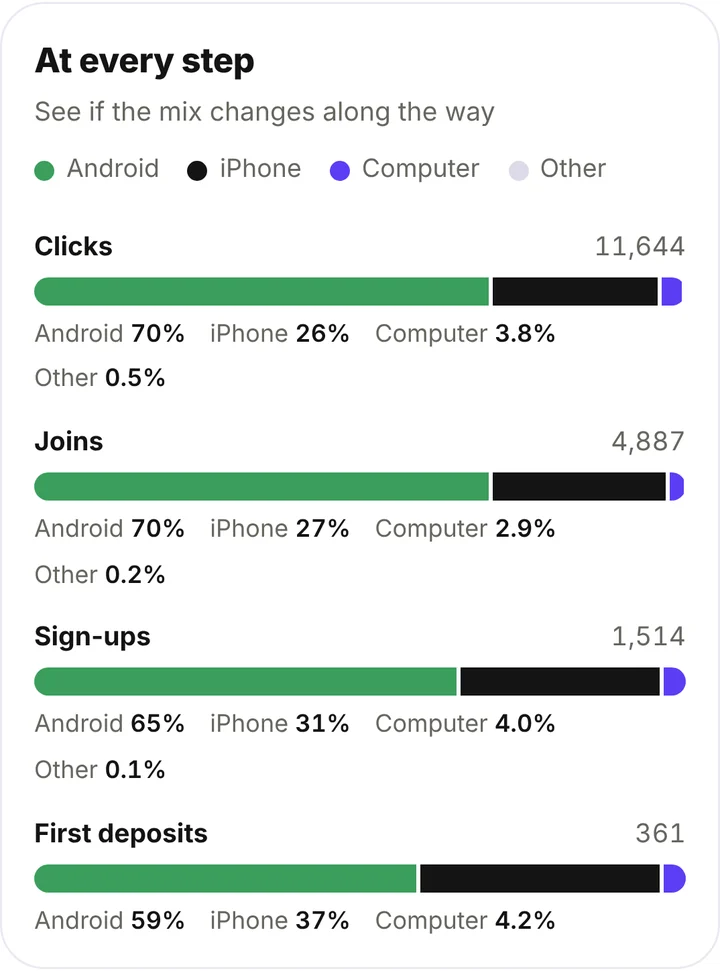
This is where the useful findings usually are. If the bars look the same from top to bottom, every device converts about the same and you don’t need to change anything. If one colour grows as you go down, that device brings more than its share of deposits.
Track this in Joinvoo, free.Every join, start and deposit matched to the ad that drove it. First 500 joins on us.Start free3. Who brings the money
If you track deposit amounts or sales, a third card splits the money by device:
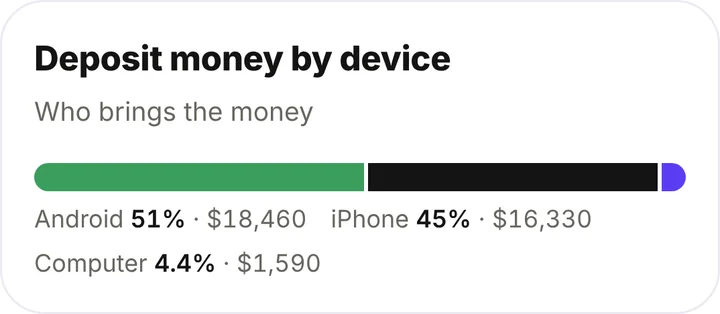
This matters because a device can bring fewer depositors but bigger deposits. In the example above, iPhone is about a quarter of the clicks but close to half of the money.
4. By country
If your ads run in more than one country, the last card shows the split in your top countries:
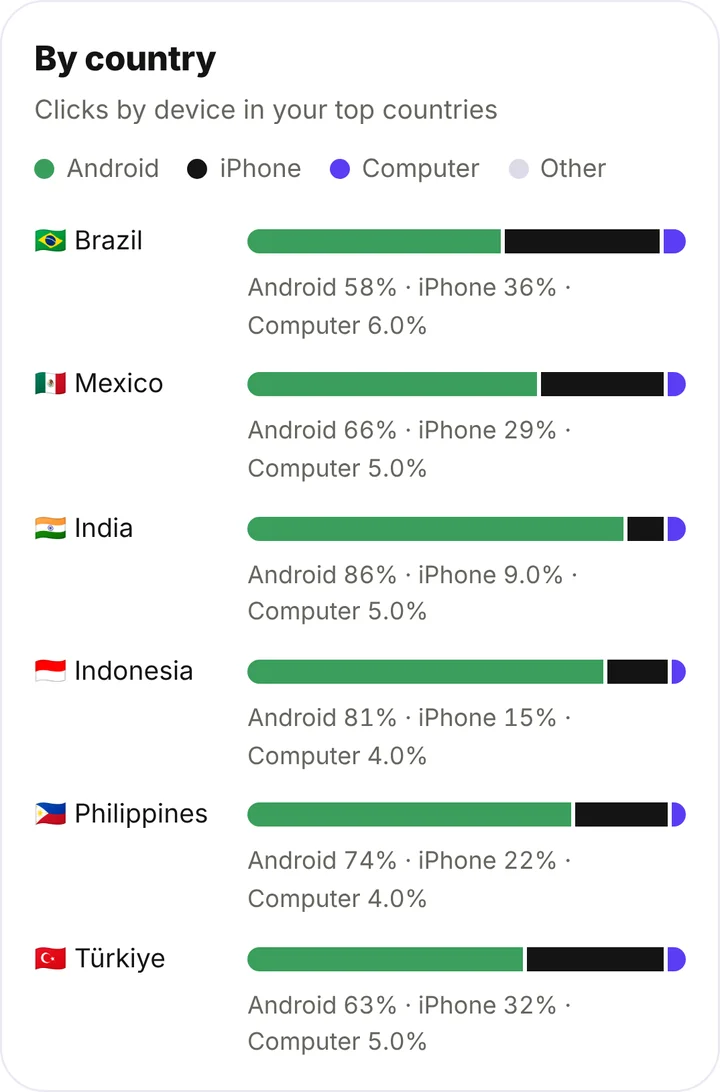
The split can be very different from one country to the next. In some markets almost everyone is on Android, in others iPhone is close to half. If you run one campaign across several countries, this tells you whether one ad set per device makes sense in each.
What to do with it
Aim your ads. Meta and TikTok both let you target by operating system. If iPhone users deposit much more often, try a separate iPhone-only ad set with its own budget, so the platform can’t spend it all on the cheaper Android clicks. Keep the Android ad set running and compare the cost per first deposit after a week.
Fix your landing page or bot for the device that matters. If 90% of your people are on Android phones, test your page and your bot on a mid-range Android phone, not only on your own phone.
Decide which app to build first. If you’re planning an app, the split tells you where your people already are. “Most of my audience is on Android, but iPhone brings almost half the money” is a real answer: build Android first and don’t wait long on iPhone.
What it can and can’t show
- It counts people who came through a tracked ad link. People who joined your channel without one (organic joins, a link shared in another group) aren’t in it, because Joinvoo never saw their device.
- It shows the device, not the phone brand or the system version. Chrome on Android now hides the phone model and reports every phone as “Android 10”, so a brand or version list would be wrong for most people. We’d rather show nothing than a wrong number.
- On Basic after the trial, you see clicks and joins by device. First deposits, sales and money by device are part of Pro, like the rest of the deposit reports.
Ask Joe or your AI
You can also just ask. Joe and the AI apps connected to Joinvoo can now group your results by device, so “Which devices convert best this month?” gets a straight answer with the numbers.
Open Results → People → Devices in your dashboard and see what your audience uses. New to Joinvoo? Start free and it fills in from your first tracked click.